Procedural Generation Part 1: Structured Dungeons
Procedural generation is a way to turn rules, seeds, and validation into data; in this case for dungeon maps. It is not a substitute for design, instead your effort goes into designing the interwoven procedural algorithms and systems. Procedural generation is not simply the random placement of rooms and corridors; the algorithms are often deterministic. This means one seed will always produce the same result, the same as minecraft worlds.
Roguelike maps carry the game. The layout decides how players explore, combat encounters and loot/resources. Whether these entities are reachable and how, as well as any extra environmental interactions.
But the boring checks matter the most:
- Spawn and exit location
- Viable routes between areas
- Objective & loot reachability
- Readable terrain
- Space vs. Crowdedness
Structured dungeon algorithms make places that feel purposefully built. That constructed feel can be read as human-like architecture, or an intelligent species, faction, or culture that builds on purpose. The original scope for the game was as a simple dungeon crawler roguelike, so these are some of the first algorithms that were implemented.
At A Glance
Quick Links
All four approaches divide the map into named spaces, then connect those spaces with routes the generator can inspect and verify.
Algorithm Comparison
| Algorithm | Best Used For | Primary Controls | Failure To Check |
|---|---|---|---|
| Rooms And Corridors Classic room graph |
Clear rooms, routes, and encounter pace | Room size, padding, corridor graph | Reachability and repeated room feel |
| Room Masks And Templates Authored rooms |
Recognizable shrines, vaults, or shops | Template symbols, rotations, fit rules | Fit failures and overused templates |
| Binary Space Partitioning Planned wings |
Forts, prisons, barracks, and keeps | Split rules, minimum leaf size, room inset | Over-regular partitions |
| Socketed Prefab Grammars Linked pieces |
Temples, set pieces, and quest rooms | Socket tags, piece cap, terminal pieces | Dead sockets and missing required rooms |
Rooms And Corridors
Room-and-corridor generation is the traditional roguelike workhorse:
- Start with a solid grid
- Place rooms
- Reject overlaps
- Carve accepted rooms into the floor
- Connect them with corridors
- Then pick a spawn room and an exit room.
If a programmer is asked to write a dungeon generator, they will probably start with this.
Players visually read rooms quickly. Rooms can be assigned a purpose: one can hold enemies, another can be a shrine, or stair room. Corridors control the pace between those content-filled areas, or could optionally become stages of their own.
Pseudocode
function generateRoomsAndCorridors(width, height, roomCount, rng):
  grid = fillWithWalls(width, height)
  rooms = []

  repeat until rooms.count == roomCount or attempts are exhausted:
    room = randomRoom(rng)
    if room is inside grid and does not overlap rooms:
      rooms.add(room)
      carveFloor(grid, room.cells)

  for each neighboring pair in rooms:
    start = connectorCell(pair.first)
    end = connectorCell(pair.second)
    carveCorridor(grid, start, end)

  spawn = centerOf(rooms.first)
  exit = farthestRoomFrom(spawn, rooms)
  markExit(grid, exit)

  return grid
Process
- Fill the map with walls.
- Try random room placements until enough rooms fit or attempts run out.
- Reject rooms that overlap or fall outside the map.
- Carve accepted rooms into the floor.
- For each neighboring room pair:
- Choose connector cells.
- Carve a corridor between them.
- Put the spawn in the first room.
- Put the exit in the farthest suitable room.
- Validate that the player can reach the exit.
Flow

Generation Stages
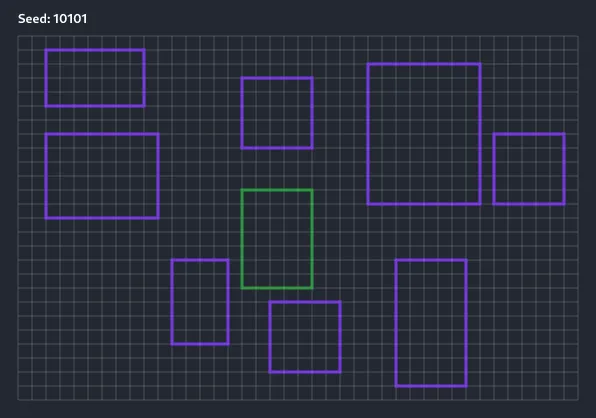
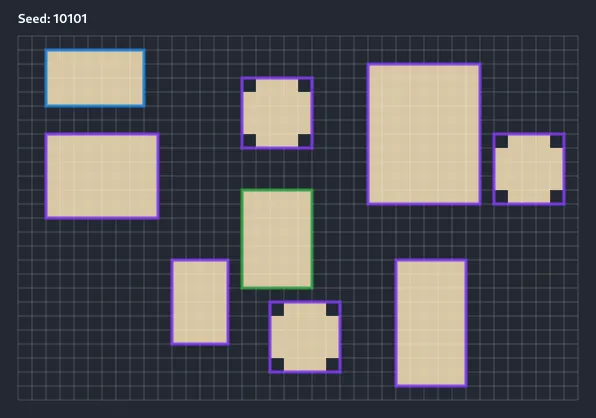
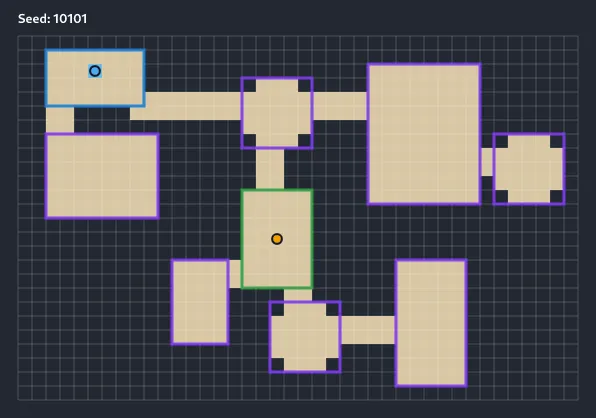
The staged images show the algorithm before decoration gets involved.
Step 1: Accept room placements.
Step 2: Carve rooms.
Step 3: Connect corridors, then mark spawn and exit.
Room Graph
Rooms and corridors also form a graph. The grid proves where actors can walk; the graph explains how spaces relate to each other.
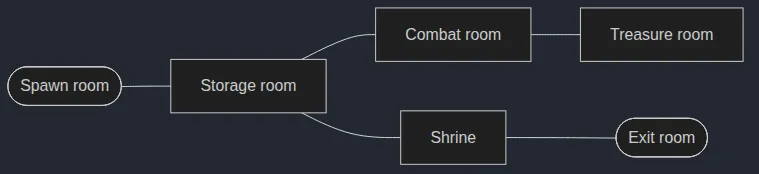
A room graph helps, but it is not a formal proof.
It can say that the shrine connects to the exit while the real-game grid still has a blocked corridor, missing door, or errant prop in the way. The graph is a plan, not a guarantee. Flood fill or pathfinding on the final grid is the proof.
Tuning Notes
- Tune room count, minimum and maximum room size, room padding, corridor style, and loop chance.
- Those values decide whether the dungeon feels sparse and dangerous, dense and tactical, or wide enough for set-piece encounters.
Room Masks And Templates
Simple rectangle-only rooms carry a prototype a long way, but they become visually boring to a player quite quickly. A room mask lets a room be any shape that can be imagined inside a rectangular boundary:
- Circles for towers
- Crosses for churches
- Compound rooms
- Unusual features like breaks in walls
Masks are for spaces available for human authorship and that the player should recognize:
- Shrines
- Vaults
- Prisons
- Shops
- Boss rooms
Template Pattern
A template is a small text pattern:
#######
#..+..#
#.....#
#..x..#
#######
Process
- Read the template as a small symbol map.
- Treat floor symbols as the room's playable area.
- Treat connector symbols as preferred corridor attachment points.
- Treat objective symbols as exit, loot, or quest anchors.
- Try placing the mask inside the larger level.
- Reject placements that overlap existing rooms or leave the map.
- Carve only the template's accepted floor cells.
Flow

Symbols
Each symbol is part of the room contract:
#is outside the room.is floor+is a preferred corridor connectorxis a preferred exit or objective point
Templates add authored rooms without forcing the whole level to be authored.
Tuning Notes
- Treat template frequency as part of the design vocabulary.
- Common templates define the everyday room stock.
- Rare templates should stay rare enough to feel like vaults, shrines, or objective rooms.
- Rotation rules, required anchors, and fit padding decide how easily those templates can appear.
Generated Example
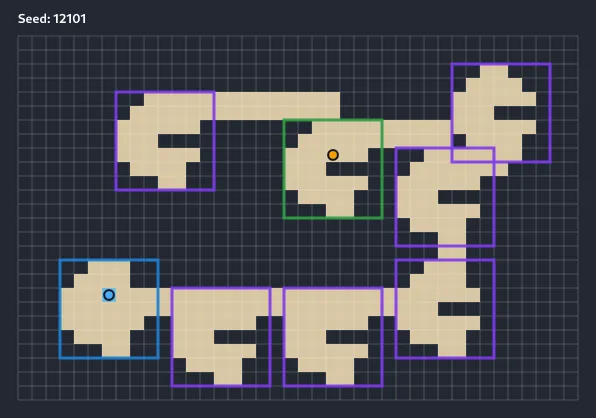
In the generated example, the template's bounding box still matters for placement, but only the accepted mask cells become floor. The room can have an irregular footprint while still participating in the same room graph and corridor validation as rectangular rooms.
Binary Space Partitioning
Binary space partitioning (BSP) recursively splits the map into smaller rectangles, this mimics the interior of a building. Each final rectangle can be assigned a purpose to become a room, yard, cell block, barracks, or guard hall.
BSP fits the situation when the building should feel planned at a larger scale. Forts, prisons, strongholds, keeps, and barracks benefit from the wing-like structure that partitioning creates.
Pseudocode
function generateBspDungeon(bounds, targetLeaves, rng):
  leaves = [bounds]

  while leaves.count < targetLeaves:
    leaf = largestLeafThatCanSplit(leaves)
    if leaf does not exist:
      break

    first, second = splitHorizontallyOrVertically(leaf, rng)
    replace leaf with first and second

  rooms = []
  for leaf in leaves:
    room = carveRoomInside(leaf, rng)
    rooms.add(room)

  connectRoomsThatShareSplitParents(rooms)
  return rooms
Process
- Start with one rectangle covering the usable map.
- Repeatedly split the largest valid rectangle.
- Choose a horizontal or vertical split.
- Replace the parent rectangle with its two children.
- Stop when the target number of leaves is reached or no rectangle can split cleanly.
- For each final rectangle:
- Carve one room inside it.
- For each sibling pair in the split hierarchy:
- Connect the regions so the whole structure stays reachable.
- Use the partitions as implied wings, districts, or stronghold sections.
Flow

Generated Example
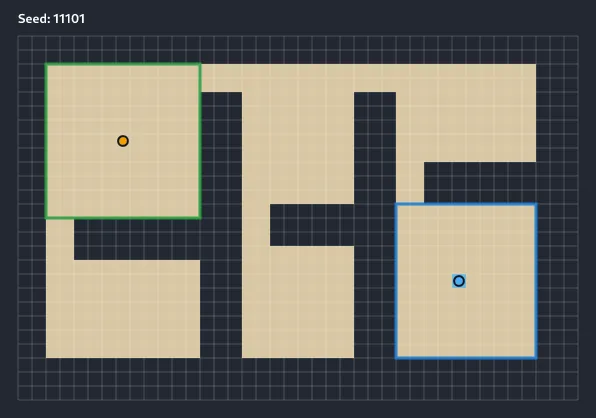
Split Tree
BSP produces both a final grid and the split tree that led to it. The split tree is a design structure: it tells the generator which rooms are siblings and which regions should connect first.
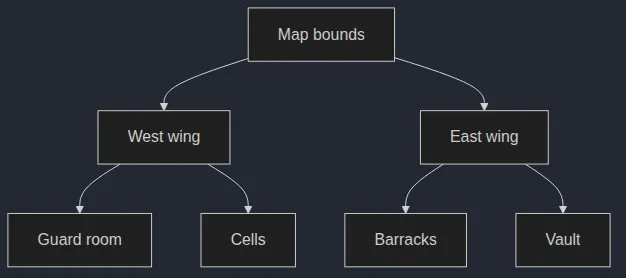
The main risk is monotony: If every split and room is too regular, the level starts to feel like office space. Use variation, where the pattern is broken up, with different: room sizes, courtyards, loops, and blocked sections.
Tuning Notes
The controls to watch are:
- Minimum leaf size
- Split bias and variance
- Room inset
- Sibling connection rules
Small changes here decide whether the result feels like a rigid prison, a keep with wings, or a looser stronghold.
Socketed Prefab Grammars
Socketed prefabs are authored map-chunks that connect through matching exits called sockets. A temple might have a gate piece, hall pieces, side chapels, a library, and a sanctum. Each piece declares where another piece can attach.
Use socketed prefabs when authored content needs to appear without locking the whole map to one layout. A temple can guarantee a gate, side chambers, and a sanctum while still changing shape from seed to seed. This allows for the deployment of authored quests while keeping the map flexible.
Pseudocode
function generateSocketedLevel(rng):
  placed = [placeStartingPrefab("gate")]
  openSockets = socketsFrom(placed)

  while openSockets is not empty and placed.count < limit:
    socket = chooseSocket(openSockets, rng)
    prefab = choosePrefabThatFits(socket, rng)
    transformed = alignPrefabToSocket(prefab, socket)

    if transformed is inside map and does not overlap placed:
      placed.add(transformed)
      openSockets.remove(socket)
      openSockets.add(unmatchedSockets(transformed))
    else:
      markSocketFailed(socket)

  attachTerminalPrefab(openSockets, "sanctum")
  carveAllPrefabs(placed)
Process
- Place a required starting piece, such as a gate.
- Collect the open sockets on that piece.
- While the layout is still growing and open sockets remain:
- Pick an open socket.
- Find a prefab with a compatible socket.
- Align the new prefab so the two sockets meet.
- Reject the prefab if it leaves the map or overlaps an existing piece.
- If it fits, place it and add its unused sockets to the open list.
- Attach a required terminal piece, such as a sanctum.
- Carve all placed prefab rooms into the map.
Flow

The layout still changes, but every piece carries authored intent Quest rooms, themed encounters, and faction bases often need that mix of variation and control.
Generated Example
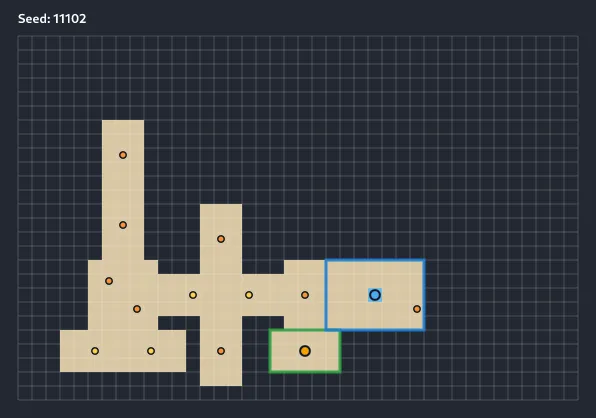
Socket Compatibility
A socket is a request/promise that two authored pieces can meet at compatible exit nodes. The generator is not placing random rectangles; it is choosing a piece whose own socket can attach to an open socket already on the layout. I think of this a little bit like the puzzle game dominoes.
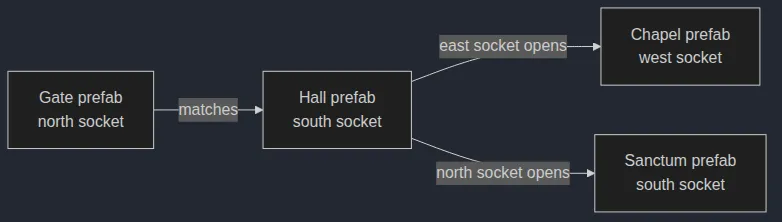
Most prefab bugs come from failed sockets. If too many placements fail, the level may end up tiny or miss its final room.
Tuning Notes
- Piece usage weights
- Maximum piece count
- Socket tags
- Required terminals
- Retry caps
- Fallback pieces
Those controls decide how much the layout can branch while still guaranteeing the authored content the design depends on.
Common Failure Modes
| Failure | What Happens | Better Check Or Fix |
|---|---|---|
| Awkward room overlap | Rooms merge, touch oddly, or leave one-tile gaps. | Check full room bounds plus padding, not just visible floor cells. |
| Center-cut corridors | Hallways slice through important room play space. | Connect through edge connector cells, doors, or thresholds. |
| Unreachable exit | The screenshot looks fine, but the seed is broken. | Flood fill or pathfind from spawn to exit after all risky passes. |
| Decoration blocks route | Props close the only corridor after topology. | Reserve the main route and recheck reachability after blocking props. |
| Samey rooms | Every chamber feels like another rectangle. | Mix sizes, masks, templates, purposes, landmarks, and fixture rules. |
| Missing prefab terminal | A temple has no sanctum, boss room, or final beat. | Use required terminal fallbacks, retry caps, and final validation. |
| Over-regular BSP | The level feels like offices. | Vary split ratios, room insets, loops, and room dressing. |
| Repeated templates | Authored rooms stop feeling special. | Track template frequency and reserve rare templates for key beats. |
Structured generation is worth starting with because its pieces can add real identity to the game at early stages.
Part 2 of this series on procedural generation will move from built spaces to the organic with cellular automata.